
New The SheepTerm Guide →

One terminal for every connection

SSH, serial, Telnet and a local shell in one fast, native app — with split panes, file transfer, Ping, sync and an AI panel. Free.

Free for Mac, Windows and Linux · All platforms
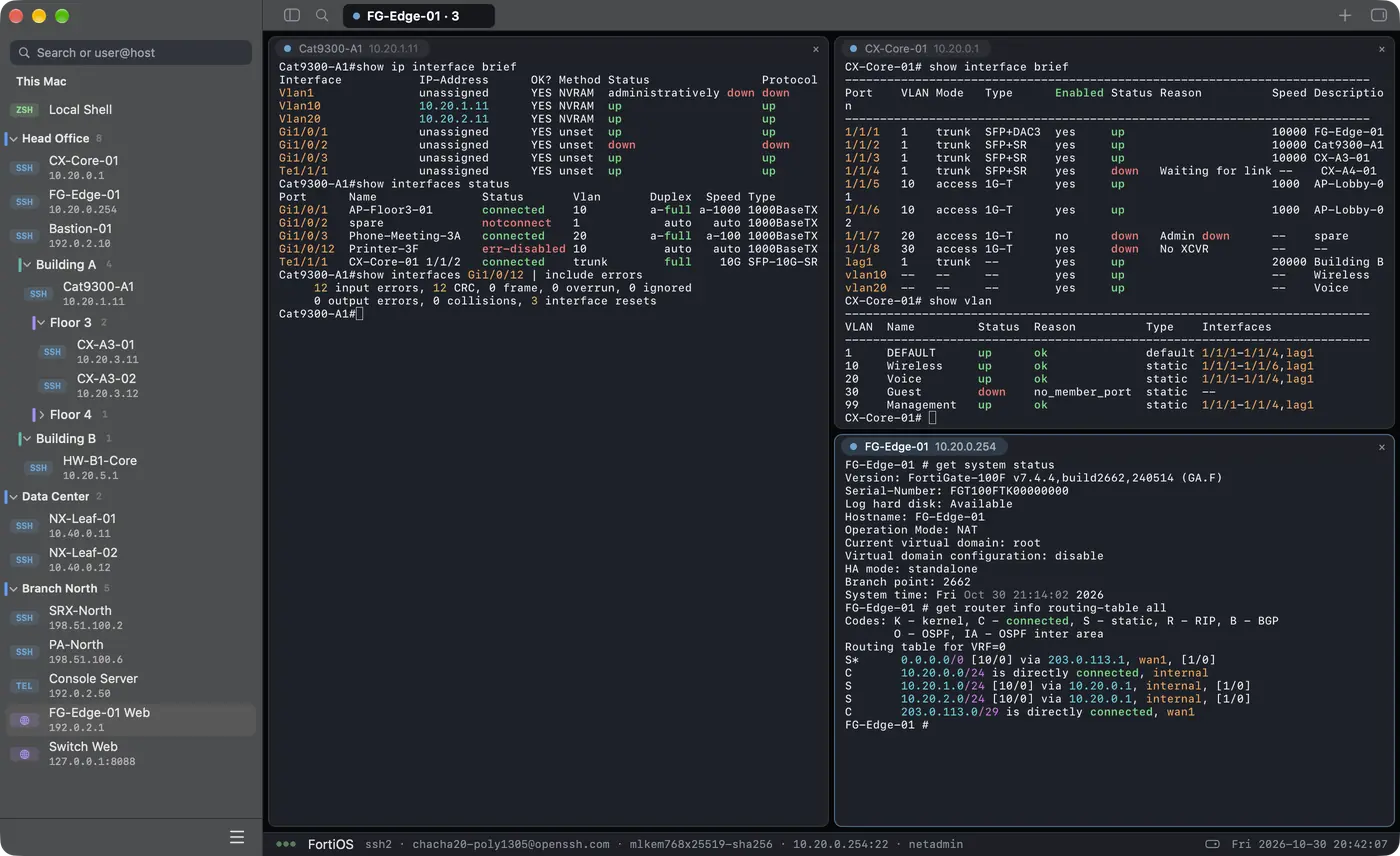
SheepTerm with three panes: a Cisco switch, an Aruba CX switch and a FortiGate firewall, each highlighted for its vendor, beside a sidebar of nested groups

Knows the output of

Cisco IOS · NX-OSAruba CXArubaOSHuawei VRPH3C ComwareJuniper JunosPalo AltoFortiGateCheck PointLinux

Features

Everything you connect to, in one place

Servers, switches, routers, firewalls, containers and boards on a serial cable.

Highlighting

Output you can read at a glance

Interfaces, VLANs, addresses, MACs and error counters, coloured the way each platform prints them.
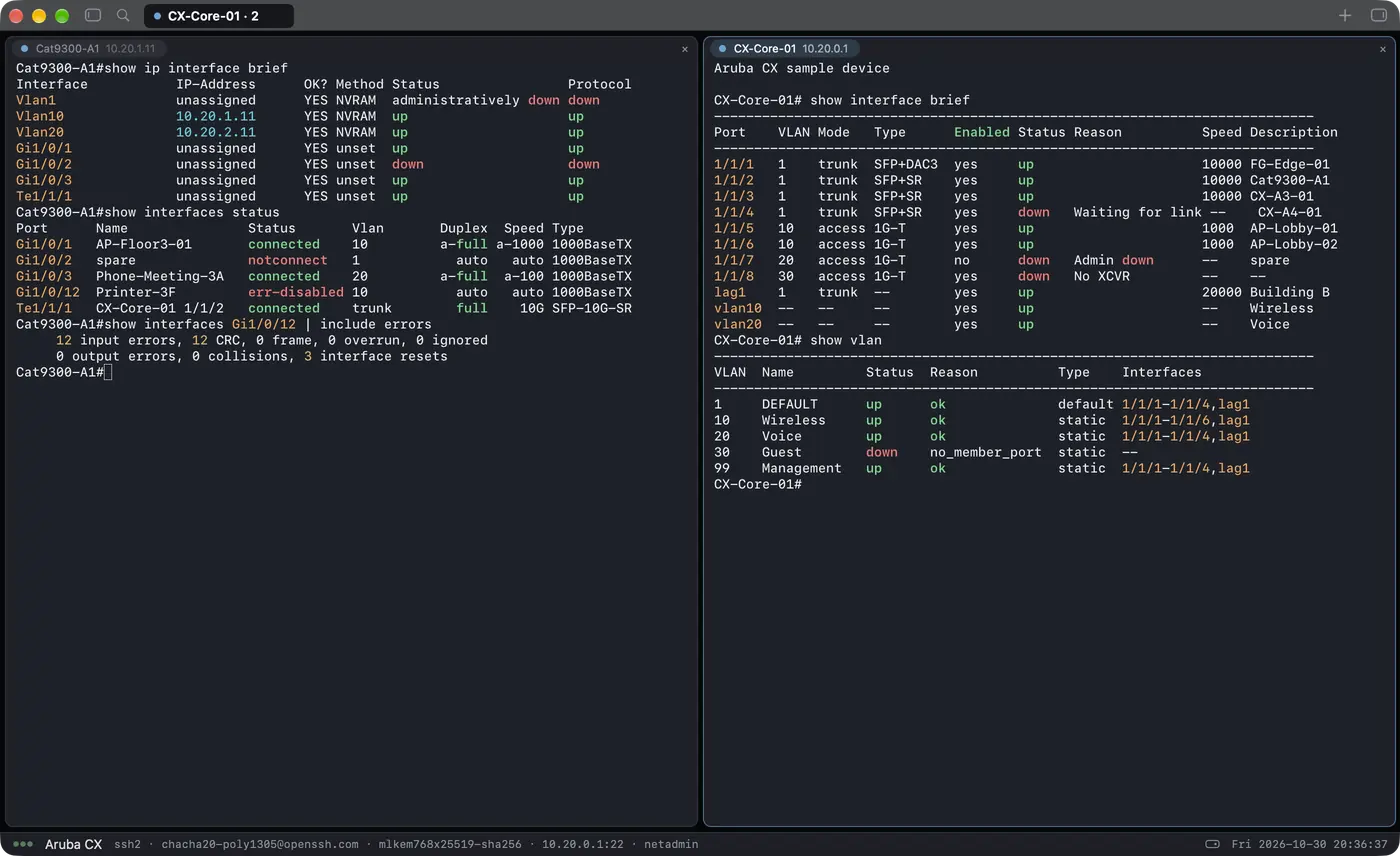
  • Detected from the stream — or pick the family per host
  • Device colours are never overridden
  • Non-zero error and drop counters stand out
CiscoAruba CXArubaOSHuaweiH3C / ComwareJunosPAN-OSFortiOSCheck PointLinux
Cisco, Aruba CX and FortiGate output, each highlighted for its vendor
Workspace

Nine devices in one tab

Split any tab up to 3 × 3, and file hosts the way your network is built.
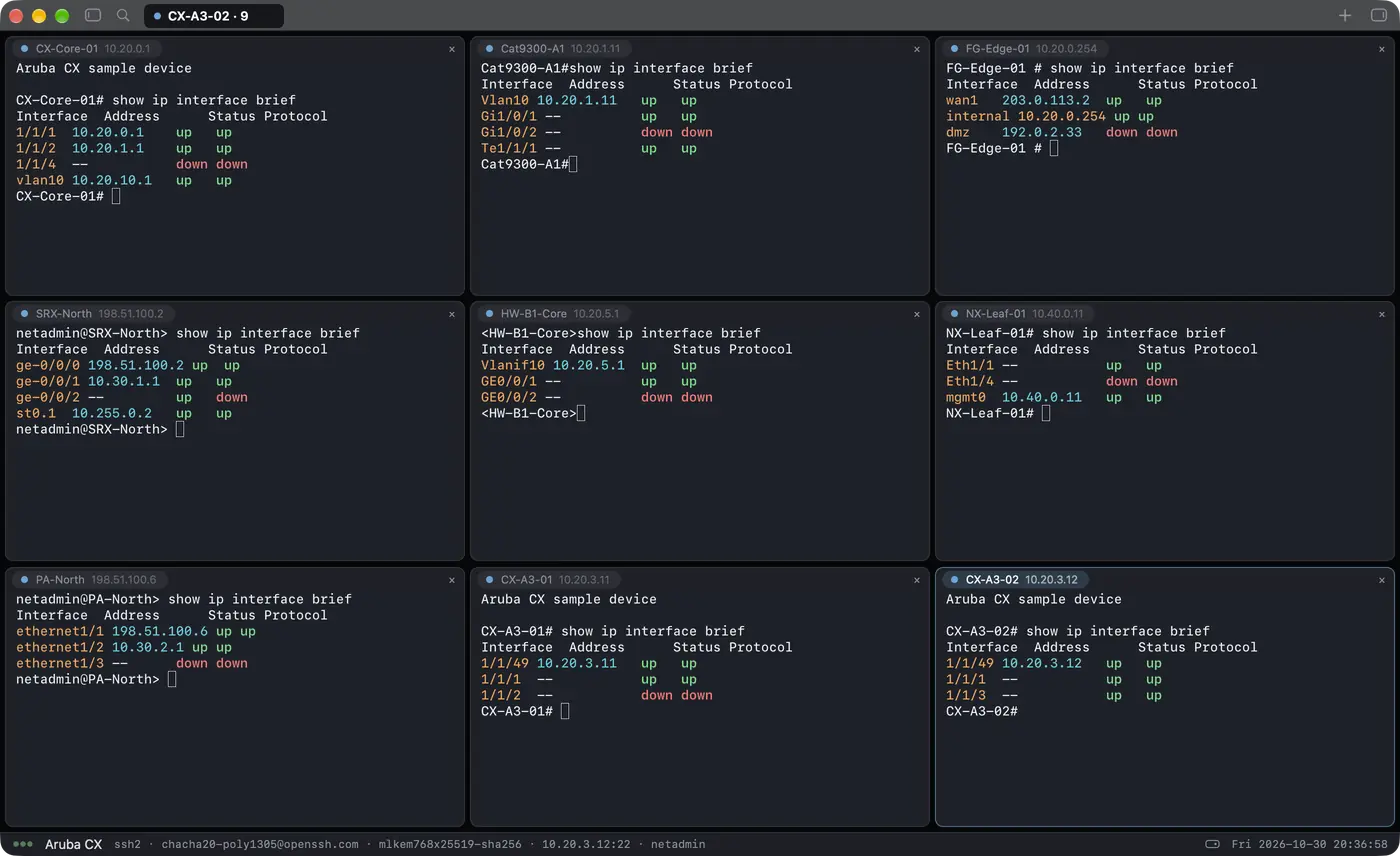
  • Drag a host onto a pane edge — it opens on that side
  • Groups inside groups, up to four levels, with icons and colours
  • Every pane can go through a jump server
A tab split three by three with nine device sessions
File transfer

TFTP, SFTP, SCP and FTP built in

Let a switch pull firmware from your laptop, or browse a device's files over its SSH session.
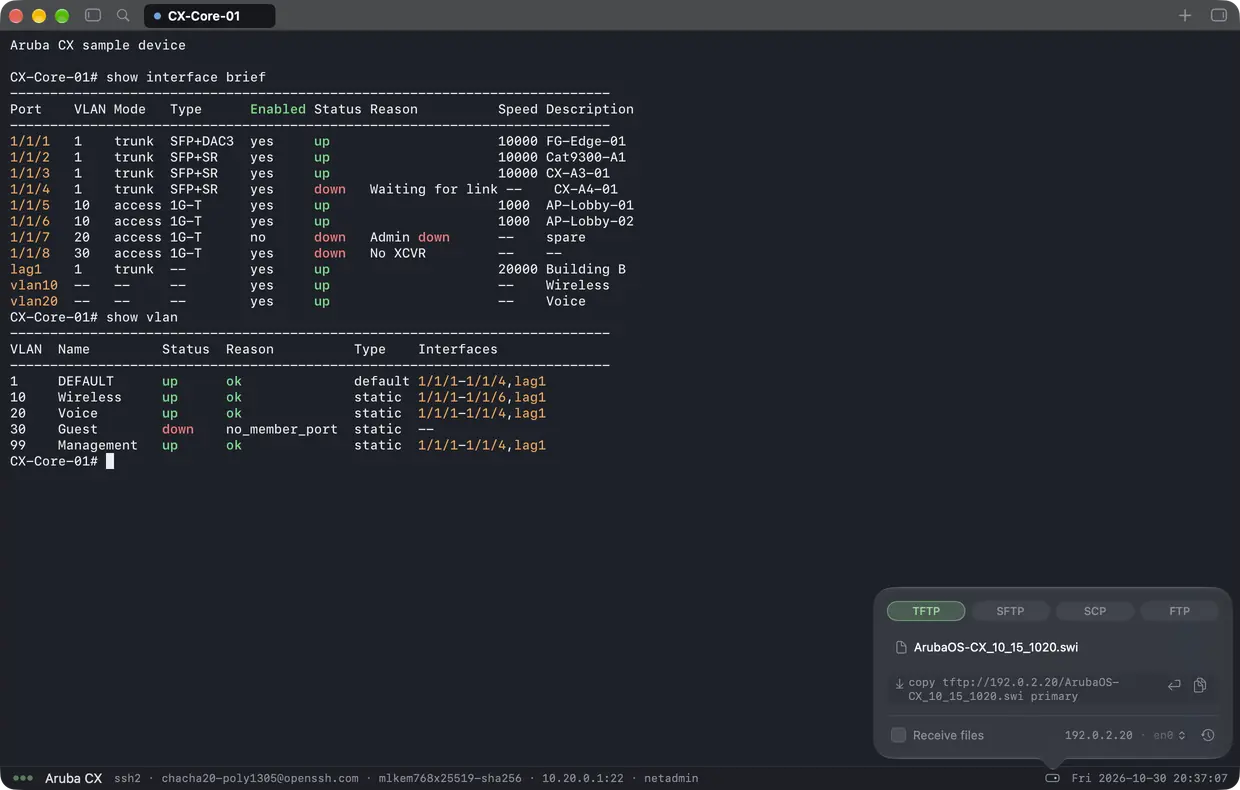
  • Servers start off and stop by themselves after 10 idle minutes
  • The copy command for your device, ready to paste
  • Uploads never overwrite a file
The File Server popover offering a TFTP copy command for an Aruba CX switch
Ping

Watch it come back while you reload

A Ping tab splits next to the console: many hosts, a live graph, and a badge that follows the latest packet.
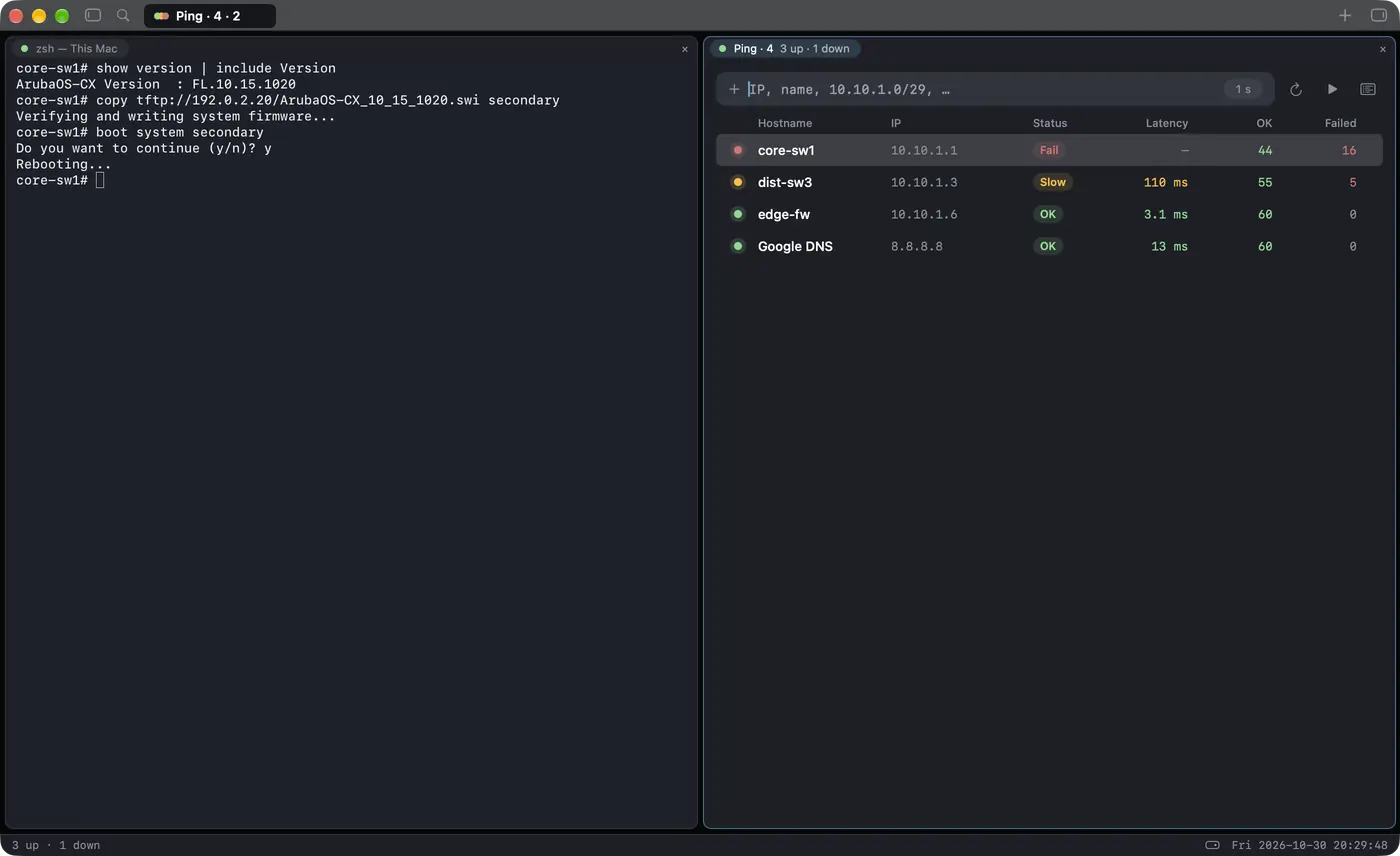
  • IPs, names or ranges like 10.10.1.0/29
  • OK, Slow over 100 ms, Fail at once
  • Per-host packet log, saved as CSV
A Ping tab split beside an SSH session
AI panel

Ask why the port is down

Claude, ChatGPT or Gemini read the output with the subscription you already have.
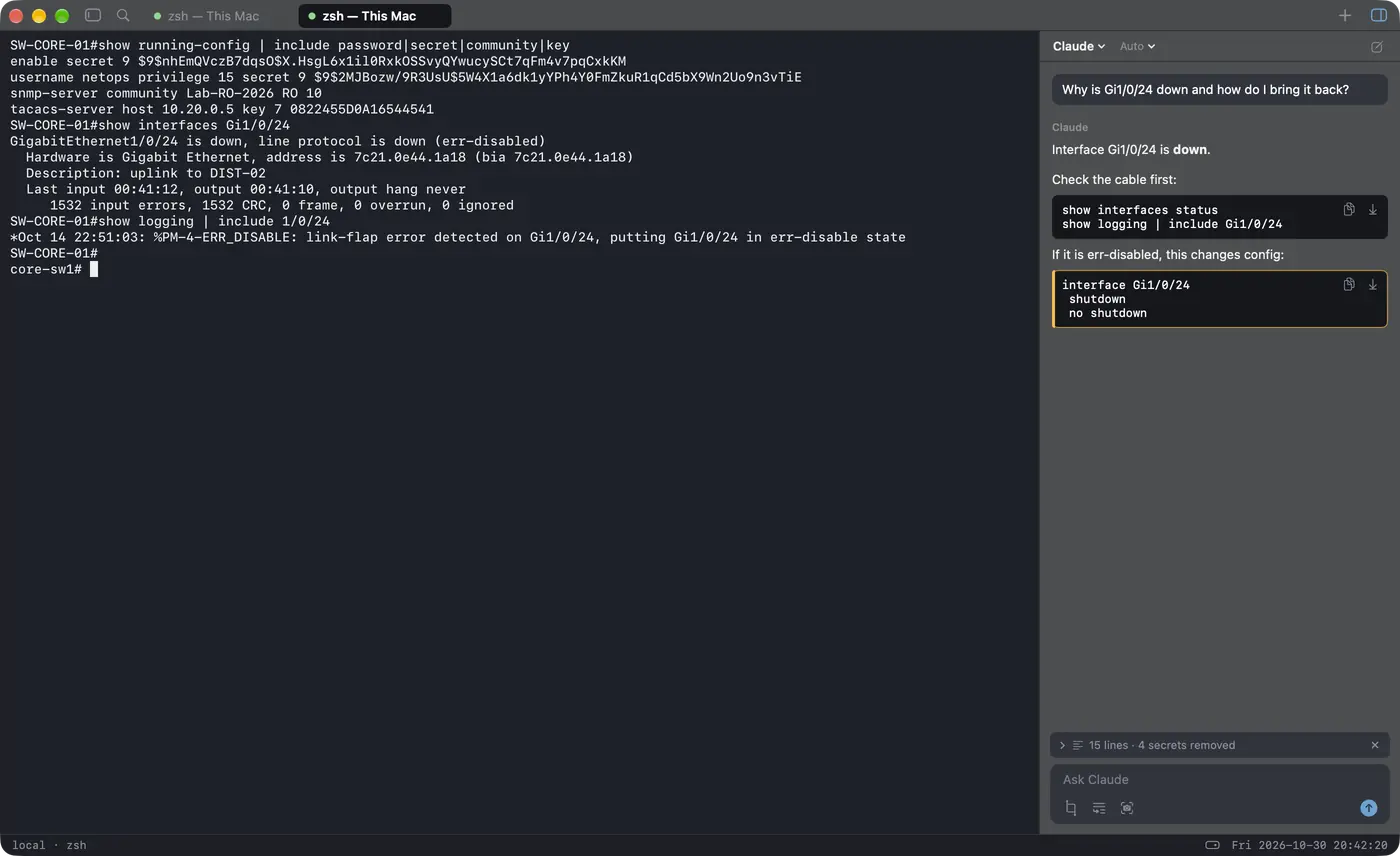
  • Passwords, keys and community strings removed before sending
  • It never runs a command
  • Off until you install and sign in to the vendor's CLI
The AI panel explaining an err-disabled interface
Sync

Your hosts on every device

Sign in with Google: hosts, groups, credentials, snippets and settings follow you — encrypted before they leave.

  • Your passphrase, end-to-end encryption
  • A private app folder in your own Drive
  • Off until you sign in

And the everyday things

Small things, done right

Device web UIs

A switch's web page next to its console, in panes like any session.

Safe Paste

Preview a config block, then send it line by line as the prompt returns.

Danger guard

reload or write erase waits for your OK, in the tab.

Console cable card

Plug in a USB console cable; pick the speed and connect.

Session logs

Every session as plain text, searchable across all logs.

Snippets & Broadcast

Saved commands with variables, sent to many tabs at once.

Jump servers

Give a host the Jump badge; groups behind it go through it.

Port forwarding

Local, remote and SOCKS forwards in a simple form.

Add many hosts

Paste from a spreadsheet or import a CSV.

Secure store only

Passwords and keys stay in the system keychain, never in a plain file.

Telnet & serial

telnet:// links from GNS3 or EVE-NG, Send Break, XMODEM.

Updates built in

Signed updates, installed with one click.

Every feature and shortcut →

Download

Free on Mac, Windows and Linux

One sync account for all of them. Always the latest release.

macOS
  • macOS 26.4 (Tahoe) or later
  • Apple Silicon
  • Signed and notarized by Apple
  • 9 languages
Download for Mac
Disk image — drag to Applications
Windows
  • Windows 10 or 11, x64
  • Portable — your data stays beside the exe
  • Web tabs, AI panel, sync
  • 9 languages
Download for Windows
Zip — unzip to your own folder, run SheepTerm.exe
Linux
  • Ubuntu, Debian, Fedora, Arch (x86_64 & ARM64)
  • .deb, .rpm, AppImage & .tar.gz
  • Web tabs, AI panel, sync
  • 9 languages

Install on Mac

  1. Open the disk image and drag SheepTerm onto Applications.
  2. Signed with Developer ID and notarized by Apple — it opens normally.
  3. Later: SheepTerm ▸ Check for Updates…

Install on Windows

  1. Unzip into a folder of your own, not Downloads.
  2. Run SheepTerm.exe. If SmartScreen appears: More info ▸ Run anyway. Your data stays in the Data folder beside the exe.
  3. Later: Help ▸ Check for Updates…

Install on Linux

  1. Debian / Ubuntu (.deb): sudo apt install ./SheepTerm-*-linux-*.deb
  2. Fedora / RHEL (.rpm): sudo dnf install ./SheepTerm-*-linux-*.rpm
  3. AppImage / .tar.gz: Right-click, open Properties → Permissions, and enable Allow executing file as program (or chmod +x SheepTerm-*.AppImage). Keep any existing Data folder beside the AppImage or binary.
  4. Later: Help ▸ Check for Updates… (updates and restarts in-app).
FreeNo account neededNo cookiesOpen source

SheepTerm is free. If it helps your work, ♥ sponsor it on GitHub.